


Auto Monkey
3.741.00 Reviews
App Specs
- Version
- 3.6.0
- Updated On
- License
- Free
- Downloads
- 10,000+
- Developer
- Auto Monkey
- Categories
- Auto & Vehicles
- Platform
- Android
Screenshots
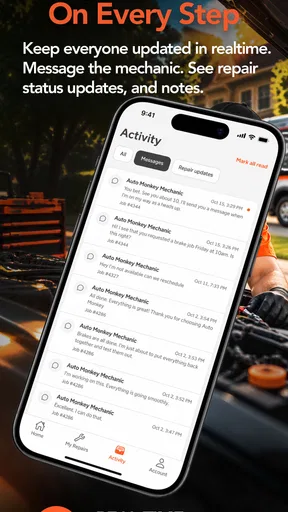
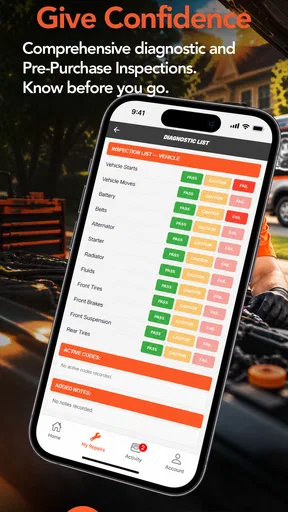
 Analysis by AppCompare
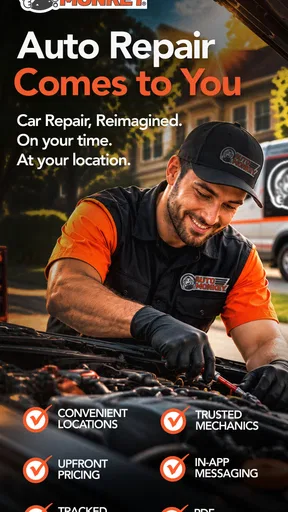
When my car needs attention, the hardest part is often not identifying the problem. It is finding a mechanic who can come to me, explaining what needs doing, and fitting the repair into an already busy day. Auto Monkey is built around that situation. It is a free Auto & Vehicles app from Auto Monkey that connects the idea of mobile mechanical help with a phone-based booking experience, so the workshop does not always have to be the place where the repair begins.
I found the appeal easy to understand during an ordinary weekday scenario. Imagine noticing a warning light before work, or discovering a flat battery while your car is parked at home. Instead of immediately arranging a tow or driving to a garage, I can use the app as the starting point for requesting mobile assistance. That does not make every repair simple, but it changes the first decision from “How do I get the car there?” to “Can someone come to the car?”
How the everyday workflow feels
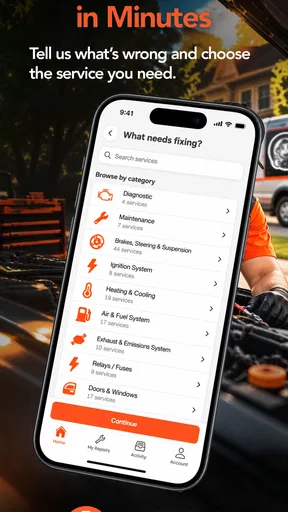
The most useful way to approach Auto Monkey is as a practical service-request tool rather than a complete replacement for a trusted mechanic. I would open it when I already know that I need help with a vehicle and want to begin the process from my phone. The basic habit is straightforward: identify the vehicle issue as clearly as possible, provide the information the service needs, and use the app to move toward an appointment or mobile visit.
That last part matters. A mobile mechanic is not automatically the right answer for every fault. A dead battery, a starting problem, a basic inspection, or a repair that can be completed where the vehicle is parked may suit this approach well. A serious collision, a car that cannot be safely accessed, or a job requiring workshop equipment may still call for a garage or recovery service. I would use Auto Monkey to reduce unnecessary travel, not to assume that every mechanical problem can be solved at the roadside.
My first recommendation is to describe the symptom rather than trying to diagnose it. “The engine turns over but does not start” is more useful than confidently calling it a fuel-pump failure when I am not trained to make that judgment. I would also note when the problem began, whether it happens every time, and whether any warning lights appeared. This creates a better starting point for the mechanic and reduces the chance of an unsuitable request.
Before submitting anything, I would check the car’s location carefully. A mobile visit depends on the mechanic reaching the correct place, and a vague location can create avoidable back-and-forth. If the car is in a large apartment complex, office car park, or roadside area, adding a clear description of the access point is a small habit with a real payoff. The app may make the request convenient, but the quality of the information still controls how smooth the next step will be.
What to prepare before requesting help
I would keep the vehicle registration details, make and model, approximate mileage, and a short description of the fault nearby before opening the app. I would also have a photo ready if the problem is visible, such as a damaged part, a flat tyre, or a dashboard warning. I would not rely on a picture to explain a noise or intermittent starting fault, but visual information can help establish the situation quickly.
Worth Reading Before You Choose

EA SPORTS FC Mobile 26 Is a Bigger Football Game, but It Takes Time

Flipboard Shows What News Apps Must Do Beyond the Feed

Switching to Android Auto Means Rethinking Your Driving Routine

Google Calendar Makes a Crowded Week Easier to Manage

Ludo King Makes the Most of the Minutes Between Plans

Baby Panda World Brings Quick Play to Modern Phones, but Its Game Library Feels Busy
There is another useful distinction between an emergency and a planned repair. If the car is blocking traffic or parked in an unsafe location, I would treat personal safety and recovery options as the priority. If it is safely parked at home, I have more time to give Auto Monkey a careful description and arrange a visit. That simple decision prevents me from expecting a normal service request to behave like an emergency response line.
Auto Monkey is rated for Everyone, which makes the interface approachable for a broad audience, including drivers who are not confident with mechanical terminology. Even so, accessible does not mean that the app can decide the repair for me. I still need to explain the symptoms accurately and understand what kind of help I am asking for. The app works best when I use it as a communication aid, not as an automated diagnosis tool.
Settings and details worth checking
There may not be much value in opening an automotive service app and immediately submitting the first request that comes to mind. I would first look through the available account, vehicle, contact, location, and appointment details so I know what information can be saved or reused. The exact choices shown on a device can depend on the current app experience, but the principle is consistent: make sure the details that identify me and my car are accurate before I need help urgently.
Vehicle information deserves particular attention. If I own more than one car, I would check which one is selected before describing the problem. Mixing up a family car and a work vehicle could send the mechanic the wrong context, especially if the two vehicles have different symptoms or service needs. If the app allows me to review entered details before sending a request, I would use that screen as a deliberate checkpoint rather than tapping through it.
Location settings are equally important. I would confirm that the service address is the place where the car is actually parked, not simply my saved home address. This is especially relevant when I am requesting help from work, a shopping area, or a relative’s driveway. A mobile mechanic needs the vehicle’s location, while my account may reflect somewhere else.
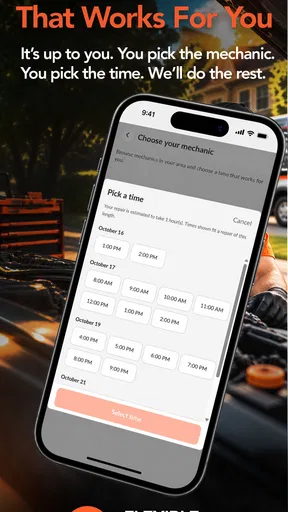
I would also check notification and contact preferences so that I do not miss a response. A mobile service depends on coordination, and an unanswered message can delay the visit even when the original request was correct. If the app presents service information, appointment details, or request status in separate areas, I would make a habit of reviewing those screens after submitting a request rather than assuming that the first confirmation contains everything I need.
One practical limitation is that convenience can make people skip the boring checks. A request sent with an incomplete description may feel fast, but it can create more work later. My better routine is to spend a minute confirming the vehicle, location, symptoms, and preferred contact method. That is not glamorous, but it is the kind of repeatable behavior that makes a service app more dependable in real life.
Faster patterns for repeat users
Experienced users can make the process quicker without pretending that the app has features it does not advertise. I would create a small personal template in my notes containing the information I commonly need: vehicle identity, location, mileage, recent work, warning lights, and the exact wording of recurring symptoms. Then, when something happens, I can copy the relevant details into the request instead of trying to remember them while standing beside the car.
Another useful pattern is separating observation from interpretation. I might write that the car makes a clicking sound, the interior lights remain bright, and the engine does not start. That gives the mechanic useful clues without turning a guess into a firm diagnosis. This habit is particularly valuable for drivers who know enough about cars to recognize a possible fault but not enough to confirm it.
I would also take a quick photo of the dashboard when a warning light appears, provided it is safe to do so. Warning symbols can disappear after restarting, and a photo preserves what I actually saw. I would include the time and circumstances in the description, such as whether the light appeared during startup or while driving. This kind of evidence is more useful than repeatedly writing that “the car seems wrong.”
For planned maintenance, I would use a different workflow from a breakdown. I would gather the service history, note the work I want discussed, and request the visit while the car is still usable. That gives me time to compare the mobile option with a conventional garage. For an unexpected fault, I would focus on safe parking, accurate symptoms, and clear access instructions. Treating these as two separate workflows keeps the request focused.
Shortcuts on the phone can help too, but they are personal habits rather than special Auto Monkey functions. I can keep the app in an easy-to-reach folder, save the vehicle information in a secure note, and use a consistent naming style for photos. These small choices reduce friction when I am stressed. They also make it easier for another family member to understand the information if they need to help arrange the visit.
There is a trade-off here. Preparing information in advance saves time, but old information can become misleading. A previous symptom may not match the current problem, and a saved address may be wrong for today’s location. I would reuse templates as prompts, never as automatic answers. Every request still needs a fresh check of the actual car and where it is parked.
Where the mobile approach is strongest
The clear strength is convenience. If the vehicle can remain where it is, a mobile mechanic may remove the awkward step of getting it to a workshop. That is valuable for people with limited time, households with one car, drivers who cannot easily arrange transport, and anyone dealing with a vehicle that starts unreliably. In those situations, the app’s central idea is more meaningful than a standard garage search.
It can also make the first conversation less intimidating. I do not need to walk into a workshop and explain a fault at the counter while trying to remember every detail. I can organize the symptoms on my phone and begin from a familiar device. For a new driver or someone who feels uncomfortable with mechanical language, that lower-pressure starting point is a genuine benefit.
Auto Monkey may also suit people who value time more than a particular workshop routine. A conventional garage can still be the better choice when I already trust its technicians, need a longer repair, or want access to specialist equipment. But for a focused job that can reasonably be carried out at the car, mobile service can be a more practical alternative than rearranging an entire day around transport.
The app’s reach is still modest compared with the huge platforms people use for general local services. It has over ten thousand installs, an average rating of 3.7, and 41 reviews, with 81 ratings overall. I read that as a sign to keep expectations realistic: the concept is useful, but I would judge the actual experience by the service available in my area and by how clearly a request is handled, not by the download figure alone.
Limits that matter before relying on it
The biggest limitation is the boundary between mobile repair and workshop repair. Some jobs need lifting equipment, a controlled environment, specialized diagnostic tools, or access to parts that cannot reasonably be carried to a parking space. Even when a mechanic can inspect the vehicle on location, the car may still need to be taken elsewhere. I would ask what can be completed during the visit and what would happen if further work is required.
I would also avoid treating the app as a guarantee of immediate help. A convenient request is not the same as instant availability. My plan for a serious breakdown would include a safe place to wait, a charged phone, and a recovery alternative if the vehicle is creating danger. Auto Monkey can be the first option I try, but I would not make it my only plan when the situation is urgent.
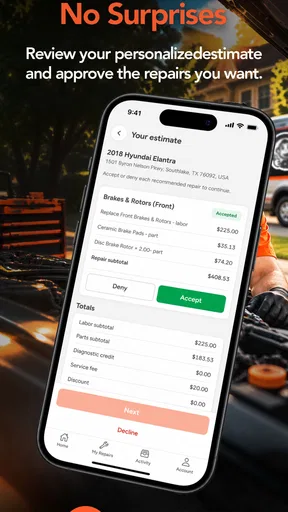
Another point is communication. The app can help me start the process, but the quality of the outcome depends on clear information and a realistic understanding between driver and mechanic. Before agreeing to work, I would want to understand the expected task, any inspection involved, and what happens if the original description turns out to be incomplete. Asking those questions is not distrustful; it is sensible when a repair begins away from a traditional workshop.
People who want extensive service-history management, detailed technical diagnostics, or a full garage-comparison marketplace may find a dedicated alternative more suitable. Likewise, drivers who already have a dependable local mechanic may gain little from changing their routine. Auto Monkey is most convincing when the mobile aspect solves a real logistical problem. If it does not, the familiar garage may remain simpler.
The current version is 3.6.0 and it supports devices running Android 6.0 or later. That makes it usable on many older Android phones, which is helpful for drivers who keep an older device in the car. I would still keep the operating system and app updated when possible, especially for an app involved in contact and location details. A compatible phone is only useful if it can connect reliably when I need it.
My verdict after building a repeatable habit
I see Auto Monkey as a focused tool for arranging mobile mechanical help, not as a complete ownership companion. Its best use is clear: I notice a problem, park safely, record the symptoms, confirm the vehicle and location, and use the app to begin a service request without automatically arranging a trip to a garage. That workflow is simple enough for occasional users and becomes faster for regular users who prepare their information in advance.
My strongest tip is to make the request precise but modest. Describe what happened, show useful visual evidence, and ask what can realistically be done on location. Do not exaggerate certainty, and do not assume that a mobile visit eliminates the possibility of a workshop repair. That approach gives the mechanic better information and protects me from expecting the wrong kind of service.
The free price makes it easy to try, and the Everyone age rating keeps the app approachable. Auto Monkey has earned a 3.7 average from its current user feedback, so I would call the experience promising rather than universally proven. I would try it for a suitable, non-dangerous problem and pay close attention to how well the request details, communication, and appointment process fit my local needs.
In the end, I would recommend it to a friend who dislikes losing half a day to a garage or who needs a practical first step when a car will not cooperate. I would not recommend relying on it alone for a hazardous breakdown, a complex repair, or a situation where workshop equipment is clearly necessary. Its real value is not that it makes every repair easy; it is that it can remove the unnecessary journey when the repair can come to the car.
Pros
- Simple controls make the game easy to pick up quickly.
- Short runs are well suited to quick gaming sessions.
- Bright visuals give the gameplay a cheerful
- casual feel.
- Unlockable content adds motivation to keep playing.
- Offline play is convenient when you have no internet access.
Cons
- Gameplay can become repetitive after extended play sessions.
- Progress may feel slow without frequent upgrades or rewards.
- Ads can interrupt the experience
- depending on the version.
- Touch controls may feel imprecise during faster challenges.
- Some features or items may require in-app purchases.
FAQs for Auto Monkey
What is Auto Monkey and what does it do?
Auto Monkey is an automation-focused mobile app designed to help users perform repeated actions with less manual input. Depending on the version and device, it may offer tools such as task sequences, touch automation, shortcuts, or scheduled actions. Before downloading, review its exact feature list and supported Android or iOS version, since available functions can differ between platforms.
Is Auto Monkey safe to download and use?
Auto Monkey should be downloaded only from an official app store or the developer’s verified website. During setup, carefully review the permissions it requests, especially accessibility, overlay, notification, or device-control access. These permissions may be necessary for automation, but they can also provide significant control over your device. Avoid unofficial modified versions and check recent user reviews before granting access.
Does Auto Monkey require special permissions or accessibility access?
Automation applications commonly require permissions that allow them to interact with other apps, display controls over the screen, or respond to system events. Auto Monkey may therefore request accessibility or similar access, depending on its features and operating system. Grant only the permissions needed for your chosen tasks, and disable them whenever you are not using the automation functions.
Can Auto Monkey run automatically in the background?
Auto Monkey may support background or scheduled automation, but its reliability depends on your device model, operating-system restrictions, battery settings, and the app being controlled. Battery optimization can stop background processes, while security updates may limit simulated touches or other automated actions. Test each routine carefully, and do not rely on it for sensitive tasks without monitoring the results.
Is Auto Monkey free, and are there in-app purchases?
The availability of free features, advertisements, subscriptions, or one-time purchases can vary by platform and app version. Check the store listing before installing Auto Monkey to confirm the current pricing and what is included. If premium tools are offered, read the subscription terms carefully, including renewal details, trial periods, and cancellation instructions, before starting any paid plan.


